


Bring Dropbox to your Symbian Device in 5 easy Steps!
Lately I’ve seen a lot of people complaining about the lack of a dedicatedDropbox Application for Symbian. Sure it would be nice to have one, as the apps on both, Android and iOS are really well done. but it seems most people don’t know that you can have a much much better way to browse your files on Symbian than the mobile web app. What better than having Dropbox integrated directly into the Filemanager? It’s easy, it’s free (if you have a free Dropbox account) and its very fast to setup! And here’s how its done:
1. Visit dropdav.com and sign up – you just enter your dropbox credentials and that’s it! This is free if you have a free Dropbox account, but will cost you a monthly fee if you have 50 or 100GB running. In case you are interested how this works, here’s a bit from dropdav’s website:

3. Hit options – map new drive

4. In the following screen enter as follows:
Name: anything you like
Address: https://dav.dropdav.com
Access Point: choose your prefered setting
Username: your dropbox username
Password: your dropbox password

5. Done! Your dropbox access is now setup and should look like this!
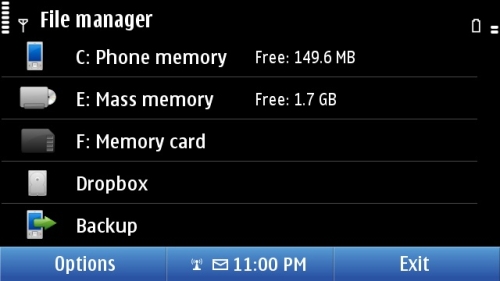
You can now enter Dropbox, hit options and connect. your content will now be shown and you can start using the content, f.e. downloading it via “copy into folder”

1. Visit dropdav.com and sign up – you just enter your dropbox credentials and that’s it! This is free if you have a free Dropbox account, but will cost you a monthly fee if you have 50 or 100GB running. In case you are interested how this works, here’s a bit from dropdav’s website:
DropDAV is a translator. It seamlessly translates communication between your WebDAV client, over the WebDAV standard, and Dropbox, via the powerful Dropbox API. Note: Dropbox imposes a file upload limit of 300 MB. Bigger files must be uploaded using the Dropbox Application.2. Grab your Symbian Phone (this even works with older ones!) and open the built-in file manager
3. Hit options – map new drive
4. In the following screen enter as follows:
Name: anything you like
Address: https://dav.dropdav.com
Access Point: choose your prefered setting
Username: your dropbox username
Password: your dropbox password
5. Done! Your dropbox access is now setup and should look like this!
You can now enter Dropbox, hit options and connect. your content will now be shown and you can start using the content, f.e. downloading it via “copy into folder”


